Dylan
Paterson
Technical Support
Specialist, FME Flow
Nia
Colebrooke
Technical Support
Specialist
Richard
Mosley
Technical Support
Team Lead
Insert Headshot
Here.
Meet the Presenters
Mark
Warren
Pre-Sales Support
Specialist
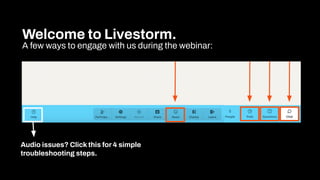
Welcome to Livestorm.
A few ways to engage with us during the webinar:
Audio issues? Click this for 4 simple
troubleshooting steps.
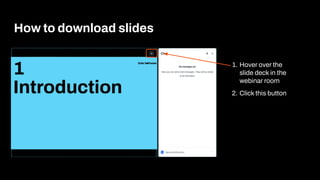
How to download slides
1. Hover over the
slide deck in the
webinar room
2. Click this button
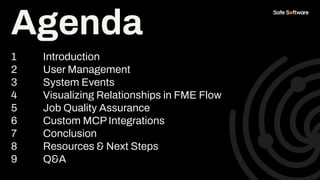
Agenda
1 Introduction
2 User Management
3 System Events
4 Visualizing Relationships in FME Flow
5 Job Quality Assurance
6 Custom MCP Integrations
7 Conclusion
8 Resources & Next Steps
9 Q&A
Agenda
Poll:
How would you describe
your current FME Flow
administration?
1
Introduction
Govern your FME Flow
environment with confidence,
and without the manual burden.
Coming next…
Chat Storm!
Chat Storm:
Where does it hurt
most?
What’s your biggest FME
Flow admin challenge today?
There is a better way with FME!
FME Flow is not just for data
workflows, it’s your automation engine
for smarter system governance.
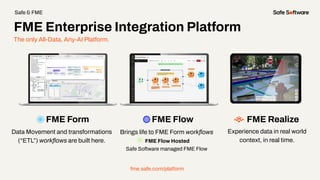
The only All-Data, Any-AI Platform.
FME Form FME Flow
Data Movement and transformations
(“ETL”) workflows are built here.
Brings life to FME Form workflows
FME Flow Hosted
Safe Software managed FME Flow
fme.safe.com/platform
FME Enterprise Integration Platform
Safe & FME
FME Realize
Experience data in real world
context, in real time.
2
User
Management
Best
Practices
● Centralized identity management
● MFA
Use Authentication Services
● Principle of Least Privilege
● Reduce admin exposure
Role Based Access Control
(RBAC)
● Monitor for suspicious activity
● Review roles, users, policies,
etc.
● Collaborate with your security
team
Regular Reviews
User
Management
Tools
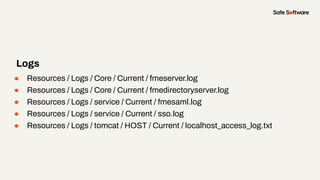
● Resources / Logs / Core / Current / fmeserver.log
● Resources / Logs / Core / Current / fmedirectoryserver.log
● Resources / Logs / service / Current / fmesaml.log
● Resources / Logs / service / Current / sso.log
● Resources / Logs / tomcat / HOST / Current / localhost_access_log.txt
Logs
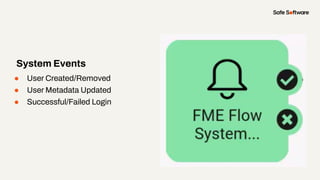
● User Created/Removed
● User Metadata Updated
● Successful/Failed Login
System Events
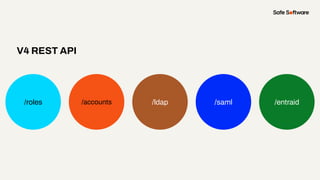
V4 REST API
/roles /accounts /ldap /saml /entraid
Slide Title
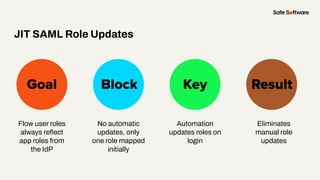
Flow user roles
always reflect
app roles from
the IdP
Goal Block Key
JIT SAML Role Updates
Result
No automatic
updates, only
one role mapped

initially
Automation
updates roles on
login
Eliminates
manual role
updates
Demo
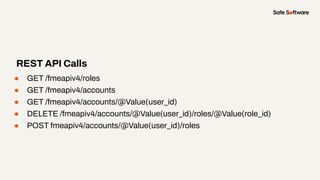
● GET /fmeapiv4/roles
● GET /fmeapiv4/accounts
● GET /fmeapiv4/accounts/@Value(user_id)
● DELETE /fmeapiv4/accounts/@Value(user_id)/roles/@Value(role_id)
● POST fmeapiv4/accounts/@Value(user_id)/roles
REST API Calls
Slide Title
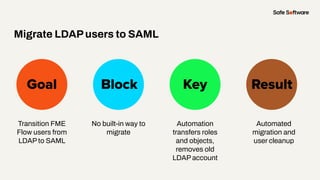
Transition FME
Flow users from
LDAP to SAML
Goal Block Key
Migrate LDAPusers to SAML
Result
No built-in way to
migrate
Automation
transfers roles
and objects,
removes old
LDAP account
Automated
migration and
user cleanup
Demo
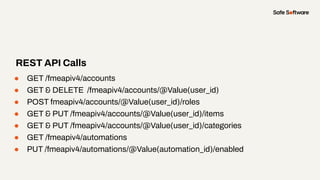
● GET /fmeapiv4/accounts
● GET & DELETE /fmeapiv4/accounts/@Value(user_id)
● POST fmeapiv4/accounts/@Value(user_id)/roles
● GET & PUT /fmeapiv4/accounts/@Value(user_id)/items
● GET & PUT /fmeapiv4/accounts/@Value(user_id)/categories
● GET /fmeapiv4/automations
● PUT /fmeapiv4/automations/@Value(automation_id)/enabled
REST API Calls
3
System
Events
Frequent changes can make it
challenging to manage your
FME Flow environment.
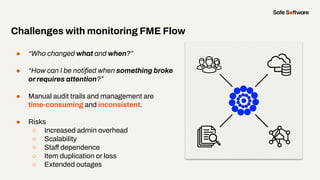
● “Who changed what and when?”
● “How can I be notified when something broke
or requires attention?”
● Manual audit trails and management are
time-consuming and inconsistent.
● Risks
○ Increased admin overhead
○ Scalability
○ Staff dependence
○ Item duplication or loss
○ Extended outages
Challenges with monitoring FME Flow
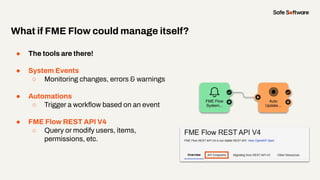
● The tools are there!
● System Events
○ Monitoring changes, errors & warnings
● Automations
○ Trigger a workflow based on an event
● FME Flow REST API V4
○ Query or modify users, items,
permissions, etc.
What if FME Flow could manage itself?
Slide Title
Reduce manual
sharing for new
items on Flow.
Goal Block Key
Auto-Update Permissions on New Items
Result
By default,
newly-created
items aren’t
shared.
Monitor system
events with
Automations and
the REST API.
Automatically
update
permissions for
new items.
Demo
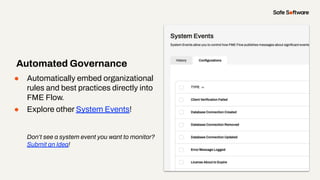
● Automatically embed organizational
rules and best practices directly into
FME Flow.
● Explore other System Events!
Don’t see a system event you want to monitor?
Submit an Idea!
Automated Governance
4
Visualizing
Relationships
in FME Flow
Monitor the impact of changes
and automate response
Slide Title
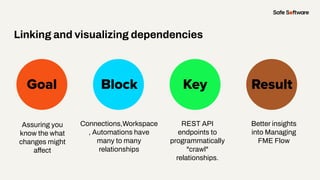
Assuring you
know the what
changes might
affect
Goal Block Key
Linking and visualizing dependencies
Result
Connections,Workspace
, Automations have
many to many
relationships
REST API
endpoints to
programmatically
"crawl"
relationships.
Better insights
into Managing
FME Flow
Demo
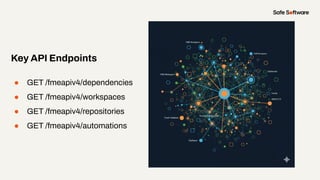
● GET /fmeapiv4/dependencies
● GET /fmeapiv4/workspaces
● GET /fmeapiv4/repositories
● GET /fmeapiv4/automations
Key API Endpoints
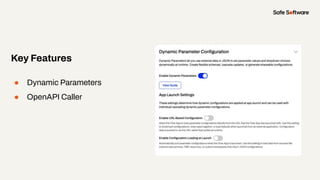
● Dynamic Parameters
● OpenAPI Caller
Key Features
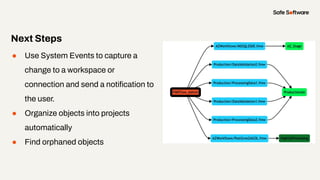
● Use System Events to capture a
change to a workspace or
connection and send a notification to
the user.
● Organize objects into projects
automatically
● Find orphaned objects
Next Steps
● Admins: Better change
management and auditing.
● Users: Confidence that their
downstream processes won't
"silently" fail.
From Reactive to Proactive
5
Job Quality
Assurance
Go beyond success and failure.
Measure output quality and
quantity .
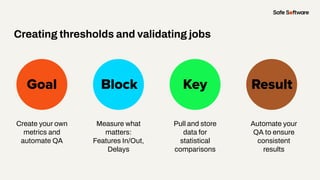
Slide Title
Create your own
metrics and
automate QA
Goal Block Key
Creating thresholds and validating jobs
Result
Measure what
matters:
Features In/Out,
Delays
Pull and store
data for
statistical
comparisons
Automate your
QA to ensure
consistent
results
Demo
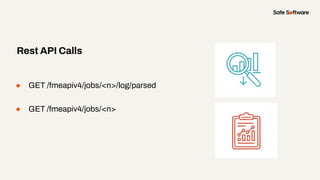
● GET /fmeapiv4/jobs/<n>/log/parsed
● GET /fmeapiv4/jobs/<n>
Rest API Calls
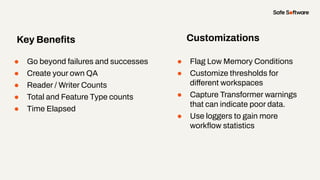
● Go beyond failures and successes
● Create your own QA
● Reader / Writer Counts
● Total and Feature Type counts
● Time Elapsed
Key Benefits
● Flag Low Memory Conditions
● Customize thresholds for
different workspaces
● Capture Transformer warnings
that can indicate poor data.
● Use loggers to gain more
workflow statistics
Customizations
5
Custom MCP
Integrations
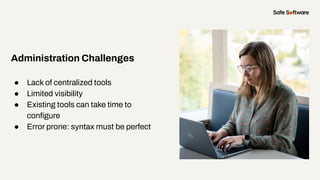
● Lack of centralized tools
● Limited visibility
● Existing tools can take time to
configure
● Error prone: syntax must be perfect
Administration Challenges
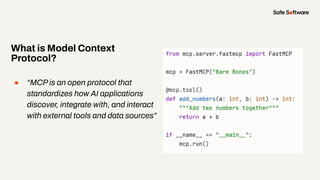
● “MCP is an open protocol that
standardizes how AI applications
discover, integrate with, and interact
with external tools and data sources”
What is Model Context
Protocol?
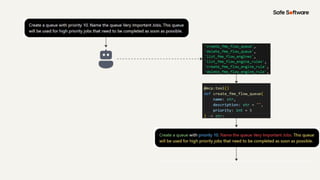
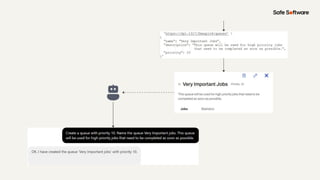
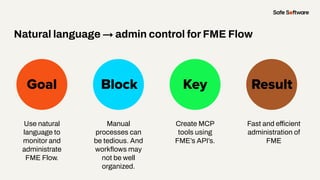
Slide Title
Use natural
language to
monitor and
administrate
FME Flow.
Goal Block Key
Natural language → admin control for FME Flow
Result
Manual
processes can
be tedious. And
workflows may
not be well
organized.
Create MCP
tools using
FME’s API’s.
Fast and efficient
administration of
FME
Demo
● One stop shop
● REST V4 API and custom tooling
○ Data Virtualization
● Can use natural language
○ In any language!
● Highly Customizable
Key Benefits
6
Conclusion
Summary
● Governance scales through
automation, not effort
● FME Flow provides the APIs and
tools you need
● Proactive administration reduces
risk and workload
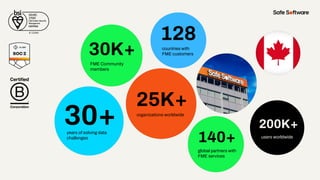
30+
30K+
128
140+
25K+
years of solving data
challenges
FME Community
members
countries with
FME customers
organizations worldwide
global partners with
FME services
200K+
users worldwide
200K+
users worldwide
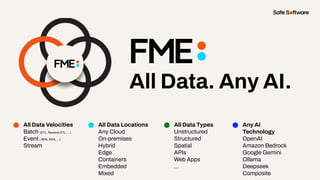
All Data. Any AI.
All Data Velocities
Batch (ETL, Reverse ETL, ...)
Event ( BPA, RPA, ...)
Stream
All Data Locations
Any Cloud
On-premises
Hybrid
Edge
Containers
Embedded
Mixed
All Data Types
Unstructured
Structured
Spatial
APIs
Web Apps
…
Any AI
Technology
OpenAI
Amazon Bedrock
Google Gemini
Ollama
Deepseek
Composite
7
Resources
Resources to
Get Started
● Getting Started with the FME
Flow REST API
● Getting Started with Data
Virtualization
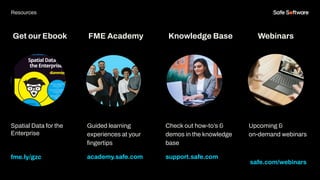
Get our Ebook
Spatial Data for the
Enterprise
fme.ly/gzc
Guided learning
experiences at your
fingertips
academy.safe.com
FME Academy
Resources
Check out how-to’s &
demos in the knowledge
base
support.safe.com
Knowledge Base Webinars
Upcoming &
on-demand webinars
safe.com/webinars
8
Next Steps
We’d love to help you get
started.
Get in touch with us at
info@safe.com
Experience the
FME Accelerator
Contact Us
A world where data is not just a
commodity but a catalyst for
real change.
fme.safe.com/accelerator
Next Steps
ClaimYour Community Badge &
Dive into the new Community!
● Get community badges for watching
webinars
● community.safe.com
● Today’s code: 4HGV9F
Join the Community today!
Next Steps
9
Q&A
ThankYou
Recap of Next Steps
1 Follow us on LinkedIn!
2 Contact us
3 Experience the FME Accelerator
Please fill out our
webinar survey

Automated Governance for FME Flow: Smarter Admin at Scale

  • 2.
    Dylan Paterson Technical Support Specialist, FMEFlow Nia Colebrooke Technical Support Specialist Richard Mosley Technical Support Team Lead Insert Headshot Here. Meet the Presenters Mark Warren Pre-Sales Support Specialist
  • 3.
    Welcome to Livestorm. Afew ways to engage with us during the webinar: Audio issues? Click this for 4 simple troubleshooting steps.
  • 4.
    How to downloadslides 1. Hover over the slide deck in the webinar room 2. Click this button
  • 5.
    Agenda 1 Introduction 2 UserManagement 3 System Events 4 Visualizing Relationships in FME Flow 5 Job Quality Assurance 6 Custom MCP Integrations 7 Conclusion 8 Resources & Next Steps 9 Q&A Agenda
  • 6.
    Poll: How would youdescribe your current FME Flow administration?
  • 7.
  • 8.
    Govern your FMEFlow environment with confidence, and without the manual burden.
  • 9.
  • 10.
    Chat Storm: Where doesit hurt most? What’s your biggest FME Flow admin challenge today?
  • 11.
    There is abetter way with FME! FME Flow is not just for data workflows, it’s your automation engine for smarter system governance.
  • 12.
    The only All-Data,Any-AI Platform. FME Form FME Flow Data Movement and transformations (“ETL”) workflows are built here. Brings life to FME Form workflows FME Flow Hosted Safe Software managed FME Flow fme.safe.com/platform FME Enterprise Integration Platform Safe & FME FME Realize Experience data in real world context, in real time.
  • 13.
  • 14.
  • 15.
    ● Centralized identitymanagement ● MFA Use Authentication Services
  • 16.
    ● Principle ofLeast Privilege ● Reduce admin exposure Role Based Access Control (RBAC)
  • 17.
    ● Monitor forsuspicious activity ● Review roles, users, policies, etc. ● Collaborate with your security team Regular Reviews
  • 18.
  • 19.
    ● Resources /Logs / Core / Current / fmeserver.log ● Resources / Logs / Core / Current / fmedirectoryserver.log ● Resources / Logs / service / Current / fmesaml.log ● Resources / Logs / service / Current / sso.log ● Resources / Logs / tomcat / HOST / Current / localhost_access_log.txt Logs
  • 20.
    ● User Created/Removed ●User Metadata Updated ● Successful/Failed Login System Events
  • 21.
    V4 REST API /roles/accounts /ldap /saml /entraid
  • 22.
    Slide Title Flow userroles always reflect app roles from the IdP Goal Block Key JIT SAML Role Updates Result No automatic updates, only one role mapped initially Automation updates roles on login Eliminates manual role updates
  • 23.
  • 24.
    ● GET /fmeapiv4/roles ●GET /fmeapiv4/accounts ● GET /fmeapiv4/accounts/@Value(user_id) ● DELETE /fmeapiv4/accounts/@Value(user_id)/roles/@Value(role_id) ● POST fmeapiv4/accounts/@Value(user_id)/roles REST API Calls
  • 25.
    Slide Title Transition FME Flowusers from LDAP to SAML Goal Block Key Migrate LDAPusers to SAML Result No built-in way to migrate Automation transfers roles and objects, removes old LDAP account Automated migration and user cleanup
  • 26.
  • 27.
    ● GET /fmeapiv4/accounts ●GET & DELETE /fmeapiv4/accounts/@Value(user_id) ● POST fmeapiv4/accounts/@Value(user_id)/roles ● GET & PUT /fmeapiv4/accounts/@Value(user_id)/items ● GET & PUT /fmeapiv4/accounts/@Value(user_id)/categories ● GET /fmeapiv4/automations ● PUT /fmeapiv4/automations/@Value(automation_id)/enabled REST API Calls
  • 28.
  • 29.
    Frequent changes canmake it challenging to manage your FME Flow environment.
  • 30.
    ● “Who changedwhat and when?” ● “How can I be notified when something broke or requires attention?” ● Manual audit trails and management are time-consuming and inconsistent. ● Risks ○ Increased admin overhead ○ Scalability ○ Staff dependence ○ Item duplication or loss ○ Extended outages Challenges with monitoring FME Flow
  • 31.
    ● The toolsare there! ● System Events ○ Monitoring changes, errors & warnings ● Automations ○ Trigger a workflow based on an event ● FME Flow REST API V4 ○ Query or modify users, items, permissions, etc. What if FME Flow could manage itself?
  • 32.
    Slide Title Reduce manual sharingfor new items on Flow. Goal Block Key Auto-Update Permissions on New Items Result By default, newly-created items aren’t shared. Monitor system events with Automations and the REST API. Automatically update permissions for new items.
  • 33.
  • 34.
    ● Automatically embedorganizational rules and best practices directly into FME Flow. ● Explore other System Events! Don’t see a system event you want to monitor? Submit an Idea! Automated Governance
  • 35.
  • 36.
    Monitor the impactof changes and automate response
  • 37.
    Slide Title Assuring you knowthe what changes might affect Goal Block Key Linking and visualizing dependencies Result Connections,Workspace , Automations have many to many relationships REST API endpoints to programmatically "crawl" relationships. Better insights into Managing FME Flow
  • 38.
  • 39.
    ● GET /fmeapiv4/dependencies ●GET /fmeapiv4/workspaces ● GET /fmeapiv4/repositories ● GET /fmeapiv4/automations Key API Endpoints
  • 40.
    ● Dynamic Parameters ●OpenAPI Caller Key Features
  • 41.
    ● Use SystemEvents to capture a change to a workspace or connection and send a notification to the user. ● Organize objects into projects automatically ● Find orphaned objects Next Steps
  • 42.
    ● Admins: Betterchange management and auditing. ● Users: Confidence that their downstream processes won't "silently" fail. From Reactive to Proactive
  • 43.
  • 44.
    Go beyond successand failure. Measure output quality and quantity .
  • 45.
    Slide Title Create yourown metrics and automate QA Goal Block Key Creating thresholds and validating jobs Result Measure what matters: Features In/Out, Delays Pull and store data for statistical comparisons Automate your QA to ensure consistent results
  • 46.
  • 47.
    ● GET /fmeapiv4/jobs/<n>/log/parsed ●GET /fmeapiv4/jobs/<n> Rest API Calls
  • 48.
    ● Go beyondfailures and successes ● Create your own QA ● Reader / Writer Counts ● Total and Feature Type counts ● Time Elapsed Key Benefits ● Flag Low Memory Conditions ● Customize thresholds for different workspaces ● Capture Transformer warnings that can indicate poor data. ● Use loggers to gain more workflow statistics Customizations
  • 49.
  • 50.
    ● Lack ofcentralized tools ● Limited visibility ● Existing tools can take time to configure ● Error prone: syntax must be perfect Administration Challenges
  • 51.
    ● “MCP isan open protocol that standardizes how AI applications discover, integrate with, and interact with external tools and data sources” What is Model Context Protocol?
  • 54.
    Slide Title Use natural languageto monitor and administrate FME Flow. Goal Block Key Natural language → admin control for FME Flow Result Manual processes can be tedious. And workflows may not be well organized. Create MCP tools using FME’s API’s. Fast and efficient administration of FME
  • 55.
  • 56.
    ● One stopshop ● REST V4 API and custom tooling ○ Data Virtualization ● Can use natural language ○ In any language! ● Highly Customizable Key Benefits
  • 57.
  • 58.
    Summary ● Governance scalesthrough automation, not effort ● FME Flow provides the APIs and tools you need ● Proactive administration reduces risk and workload
  • 59.
    30+ 30K+ 128 140+ 25K+ years of solvingdata challenges FME Community members countries with FME customers organizations worldwide global partners with FME services 200K+ users worldwide 200K+ users worldwide
  • 60.
    All Data. AnyAI. All Data Velocities Batch (ETL, Reverse ETL, ...) Event ( BPA, RPA, ...) Stream All Data Locations Any Cloud On-premises Hybrid Edge Containers Embedded Mixed All Data Types Unstructured Structured Spatial APIs Web Apps … Any AI Technology OpenAI Amazon Bedrock Google Gemini Ollama Deepseek Composite
  • 61.
  • 62.
    Resources to Get Started ●Getting Started with the FME Flow REST API ● Getting Started with Data Virtualization
  • 63.
    Get our Ebook SpatialData for the Enterprise fme.ly/gzc Guided learning experiences at your fingertips academy.safe.com FME Academy Resources Check out how-to’s & demos in the knowledge base support.safe.com Knowledge Base Webinars Upcoming & on-demand webinars safe.com/webinars
  • 64.
  • 65.
    We’d love tohelp you get started. Get in touch with us at info@safe.com Experience the FME Accelerator Contact Us A world where data is not just a commodity but a catalyst for real change. fme.safe.com/accelerator Next Steps
  • 66.
    ClaimYour Community Badge& Dive into the new Community! ● Get community badges for watching webinars ● community.safe.com ● Today’s code: 4HGV9F Join the Community today! Next Steps
  • 67.
  • 68.
    ThankYou Recap of NextSteps 1 Follow us on LinkedIn! 2 Contact us 3 Experience the FME Accelerator Please fill out our webinar survey