The UiPath word mark, logos, and robots are registered trademarks owned by UiPath, Inc. and its affiliates.
UiPath (R) is a registered trademark in the United States and several countries across the globe. See TMEP 906. ©2024 UiPath. All rights reserved.
UiPath Automation
Developer Associate
Session 3: Ui Automation
Training Series, 2026
Speakers:
Deepak Rai
Preethi Murali
2
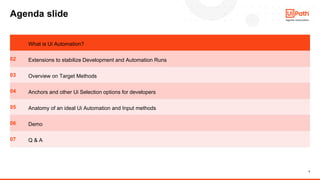
Agenda slide
01 What is Ui Automation?
02 Extensions to stabilize Development and Automation Runs
03 Overview on Target Methods
04 Anchors and other Ui Selection options for developers
05 Anatomy of an ideal Ui Automation and Input methods
06 Demo
07 Q & A
3
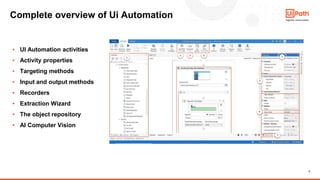
Complete overview of Ui Automation
▪ UI Automation activities
▪ Activity properties
▪ Targeting methods
▪ Input and output methods
▪ Recorders
▪ Extraction Wizard
▪ The object repository
▪ AI Computer Vision
4
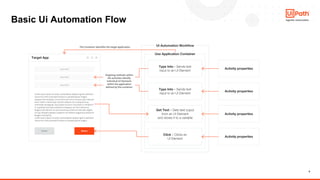
Basic Ui Automation Flow
5
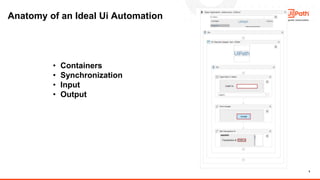
Anatomy of an Ideal Ui Automation
• Containers
• Synchronization
• Input
• Output
6
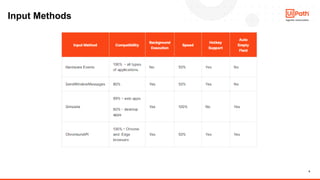
Input Methods
7
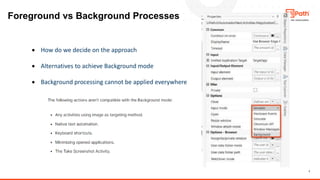
Foreground vs Background Processes
• How do we decide on the approach
• Alternatives to achieve Background mode
• Background processing cannot be applied everywhere
8
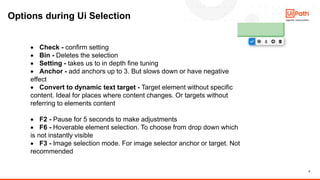
Options during Ui Selection
• Check - confirm setting
• Bin - Deletes the selection
• Setting - takes us to in depth fine tuning
• Anchor - add anchors up to 3. But slows down or have negative
effect
• Convert to dynamic text target - Target element without specific
content. Ideal for places where content changes. Or targets without
referring to elements content
• F2 - Pause for 5 seconds to make adjustments
• F6 - Hoverable element selection. To choose from drop down which
is not instantly visible
• F3 - Image selection mode. For image selector anchor or target. Not
recommended
9
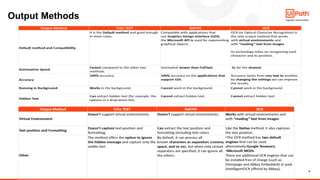
Output Methods
10
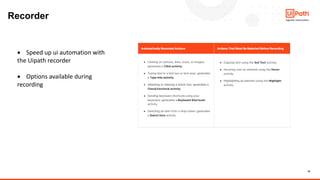
Recorder
• Speed up ui automation with
the Uipath recorder
• Options available during
recording
11
Demo
Q&A

UiPath Automation Developer Associate Training Series 2026 - Session 3

  • 1.
    The UiPath wordmark, logos, and robots are registered trademarks owned by UiPath, Inc. and its affiliates. UiPath (R) is a registered trademark in the United States and several countries across the globe. See TMEP 906. ©2024 UiPath. All rights reserved. UiPath Automation Developer Associate Session 3: Ui Automation Training Series, 2026 Speakers: Deepak Rai Preethi Murali
  • 2.
    2 Agenda slide 01 Whatis Ui Automation? 02 Extensions to stabilize Development and Automation Runs 03 Overview on Target Methods 04 Anchors and other Ui Selection options for developers 05 Anatomy of an ideal Ui Automation and Input methods 06 Demo 07 Q & A
  • 3.
    3 Complete overview ofUi Automation ▪ UI Automation activities ▪ Activity properties ▪ Targeting methods ▪ Input and output methods ▪ Recorders ▪ Extraction Wizard ▪ The object repository ▪ AI Computer Vision
  • 4.
  • 5.
    5 Anatomy of anIdeal Ui Automation • Containers • Synchronization • Input • Output
  • 6.
  • 7.
    7 Foreground vs BackgroundProcesses • How do we decide on the approach • Alternatives to achieve Background mode • Background processing cannot be applied everywhere
  • 8.
    8 Options during UiSelection • Check - confirm setting • Bin - Deletes the selection • Setting - takes us to in depth fine tuning • Anchor - add anchors up to 3. But slows down or have negative effect • Convert to dynamic text target - Target element without specific content. Ideal for places where content changes. Or targets without referring to elements content • F2 - Pause for 5 seconds to make adjustments • F6 - Hoverable element selection. To choose from drop down which is not instantly visible • F3 - Image selection mode. For image selector anchor or target. Not recommended
  • 9.
  • 10.
    10 Recorder • Speed upui automation with the Uipath recorder • Options available during recording
  • 11.
  • 12.