Mobile Development
Dr. Amr M. Nagy
Outline
 Course objectives
 Mobile application market size
 Introduction
 Mobile development approaches overview
Course Objectives
 Identify differences between hybrid and native mobile apps
 Identify popular cross-platform frameworks
 Learn Dart programming language
 Describe the main characteristics Flutter SDK
 Learn to develop mobile application using Dart and Flutter
Mobile Application Market Size
 Global mobile application market size ( > USD 206.85
billion in 2022 )
https://www.grandviewresearch.com/industry-analysis/mobile-application
market#:~:text=The%20global%20mobile%20application%20market,13.8%25%20from%202023%20to%202030.
Mobile Operating Systems’ Market Share Worldwide
https://www.counterpointresearch.com/global-smartphone-
share/#:~:text=The%20global%20smartphone%20market%20declined,Samsung%20market%20share%20of%2019%
25.
What is Mobile Development?
 The process of making software for smartphones, tablets and
digital assistants, most commonly for the Android and iOS
operating systems
 Developing a mobile application is a complex and challenging
task
 There are many frameworks available
 Android using Java/Kotlin as a programming language
 IOS using Objective-C /Swift as a programming language
Mobile Applications for Business
 Businesses wouldn’t risk missing their presence on these platforms.
 To do it :
Develop an application supporting both the OSs,
Code in two different languages using two different frameworks
 Budgeting and time, however, are usually an issue if businesses go
for native development.
 To help overcome this complexity, there exists mobile frameworks
supporting both OS (cross-platform)
Cross-Platform
 Simple HTML based hybrid mobile application framework
 Uses HTML for User Interface and JavaScript for application
logic
 Complex language specific framework
 Do the heavy lifting of converting code to native code
 Native and hybrid apps are installed in an App/Play store.
 Web apps are mobile optimized webpages that look like an app.
 Hybrid apps use app-embedded browsers to do that
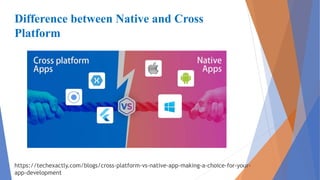
Difference between Native and Cross
Platform
https://techexactly.com/blogs/cross-platform-vs-native-app-making-a-choice-for-your-
app-development
Difference between Native and Cross
Platform
 Native Apps
 Different Codebases
 Higher cost
 Fast and Responsive
 Long Development Time
 Interact with devices’ sensors
 App Store Visibility
 Can be used offline
 Hybrid Apps
 Single Codebase
 Less cost and time
 Faster build times and faster time to market
 Can have slower performance
 Easy Integration with Web-based services
 Embedded browser to improve access to
dynamic online content
 Can have slower performance
 Limited or no access to device sensors
 Can lead to poor UX
When to use Hybrid Apps
 When your need something usable into users’ hands as quickly as
possible
 You need to create a simple version of your product that still
provides value
 Building a web app might be the truly minimal option, but it
won’t really allow you to test whether people will download and
use an app on their device.
Cross-Platform frameworks
 Ionic
 A complete open-source SDK for hybrid mobile app
 The original version was released in 2013 and built on top of
AngularJS and Apache Cordova.
 Xamarin
 A Microsoft-owned software company founded in May 2011
 A platform that lets developers build one app that works on
multiple platforms in C#
Cross-Platform frameworks
 React Native
 In 2015, by Facebook
 An open-source project based on a JavaScript engine.
 React Native allows you to program your user interfaces (UI) in one
language (JavaScript) that orchestrates native UI controls at runtime.
 For example:
 A React Native component that renders text on a mobile app will be
translated into two separate components: [TextView] for Android and
[UIView] for iOS. Thus, you are not sharing components across
platforms, you are sharing code.
Flutter
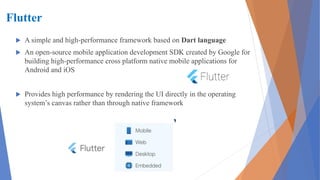
 A simple and high-performance framework based on Dart language
 An open-source mobile application development SDK created by Google for
building high-performance cross platform native mobile applications for
Android and iOS
 Provides high performance by rendering the UI directly in the operating
system’s canvas rather than through native framework
Dart
 A client-optimized programming language for apps on multiple platforms
 It is developed by Google and is used to build mobile, desktop, server, and
web applications.
 IDE for Dart
 DartPad
 VS Code
Flutter
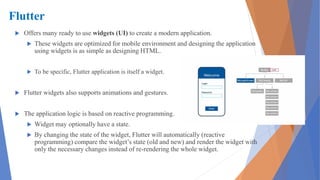
 Offers many ready to use widgets (UI) to create a modern application.
 These widgets are optimized for mobile environment and designing the application
using widgets is as simple as designing HTML.
 To be specific, Flutter application is itself a widget.
 Flutter widgets also supports animations and gestures.
 The application logic is based on reactive programming.
 Widget may optionally have a state.
 By changing the state of the widget, Flutter will automatically (reactive
programming) compare the widget’s state (old and new) and render the widget with
only the necessary changes instead of re-rendering the whole widget.
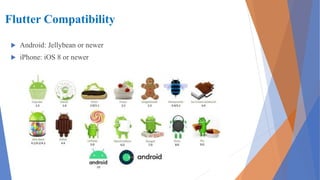
Flutter Compatibility
 Android: Jellybean or newer
 iPhone: iOS 8 or newer
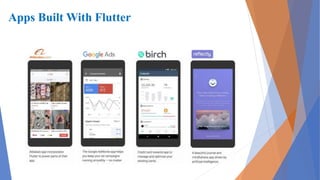
Apps Built With Flutter
Framework
 A framework is a structure that you can build software on. It serves as a foundation,
so you’re not starting entirely from scratch. Frameworks are typically associated
with a specific programming language and are suited to different types of tasks.
 Why do we use frameworks?
 Using frameworks saves time and reduces the risk of errors
 More secure code
 Simpler testing and debugging
 Avoiding duplicate code
 Clean and easily adaptable code
 Able to focus on writing code specific to the project
 Can be extended
Why Flatter?
 Google’s open-source framework.
 It supports iOS and Android and has fully customizable widgets
 Trending Technology
 Supported by Google
 Build high quality cross platform apps
Flutter advantages
 Dart has a large repository of software packages which lets you to extend
the capabilities of your application
 Developers need to write just a single code base for both applications
(both Android and iOS platforms).
 Flutter may to be extended to other platform as well in the future.
 Flutter needs lesser testing. Because of its single code base, it is
sufficient if we write automated tests once for both the platforms.
 Flutter’s simplicity makes it a good candidate for fast development. Its
customization capability and extendibility makes it even more powerful.
 With Flutter, developers has full control over the widgets and its layout.
 Flutter offers great developer tools, with amazing hot reload
Flutter disadvantages
 Coded in Dart language, a developer needs to learn new language.
 Modern framework tries to separate logic and UI
 Flutter, user interface and logic is intermixed.
 We can overcome this using high level module to separate user
interface and logic
Install Flutter
 Install Requirements
 Operating Systems: Windows 7 SP1 or later (64-bit)
 Disk Space: 1.32 GB (does not include disk space for IDE/tools)
 Tools: Flutter depends on these tools:
PowerShell 5.0 or newer
Git for Windows (with the “Use Git from the Windows
Command Prompt” option)
Get the Flutter SDK
 https://flutter.dev/docs/get-started/install/windows
 Download the latest release of the Flutter SDK:
https://storage.googleapis.com/flutter_infra_release/releases/stable/win
dows/flutter_windows_3.3.4-stable.zip
 Extract the zip-file and place the contained flutter in the desired
installation location for the Flutter SDK (eg. C:srcflutter)
 Locate and run the file flutter_console.bat inside the flutter
directory
Update your path
 Go to “Control Panel > User Accounts > User Accounts > Change my
environment variables”
 Under “User variables” check if there is an entry called “Path”:
 If the entry does exist, append the full path to flutterbin using ; as a
separator from existing values.
 If the entry does not exist, create a new user variable named Path with
the full path to flutterbin as its value
Install Android Studio
 Download and install Android Studio
 Start Android Studio and go through the ‘Android Studio Setup Wizard’
 This will install the latest Android SDK, Android SDK Platform-Tools,
and Android SDK Build-Tools, which are required by Flutter when
developing for Android.
Set up your Android device
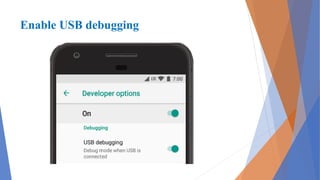
 Enable Developer options and USB debugging on your device
 On Android 4.1 and lower, the Developer options screen is available by
default. On Android 4.2 and higher, you must enable this screen as
follows:
 Open the Settings app.
 (Only on Android 8.0 or higher) Select System.
 Scroll to the bottom and select About phone.
 Scroll to the bottom and tap Build number 7 times.
 Return to the previous screen to find Developer options near the
bottom
Enable USB debugging
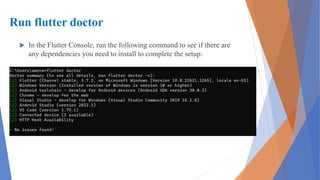
Run flutter doctor
 In the Flutter Console, run the following command to see if there are
any dependencies you need to install to complete the setup:
Summary
 Course objective
 Introduction
 Mobile development approaches overview
 What is Flutter
 Install Flutter
Resources
 https://flutter.dev/
 https://dart.dev/codelabs
 https://flutter.dev/docs/get-started/install
 https://www.netsolutions.com/insights/cross-platform-app-frameworks-in-
2019/
 https://dart.dev/platforms
 https://dart.dev/samples
 https://dart.dev/#try-dart

Introduction to Mobile app Development.pdf

  • 1.
  • 2.
    Outline  Course objectives Mobile application market size  Introduction  Mobile development approaches overview
  • 3.
    Course Objectives  Identifydifferences between hybrid and native mobile apps  Identify popular cross-platform frameworks  Learn Dart programming language  Describe the main characteristics Flutter SDK  Learn to develop mobile application using Dart and Flutter
  • 4.
    Mobile Application MarketSize  Global mobile application market size ( > USD 206.85 billion in 2022 ) https://www.grandviewresearch.com/industry-analysis/mobile-application market#:~:text=The%20global%20mobile%20application%20market,13.8%25%20from%202023%20to%202030.
  • 5.
    Mobile Operating Systems’Market Share Worldwide https://www.counterpointresearch.com/global-smartphone- share/#:~:text=The%20global%20smartphone%20market%20declined,Samsung%20market%20share%20of%2019% 25.
  • 6.
    What is MobileDevelopment?  The process of making software for smartphones, tablets and digital assistants, most commonly for the Android and iOS operating systems  Developing a mobile application is a complex and challenging task  There are many frameworks available  Android using Java/Kotlin as a programming language  IOS using Objective-C /Swift as a programming language
  • 7.
    Mobile Applications forBusiness  Businesses wouldn’t risk missing their presence on these platforms.  To do it : Develop an application supporting both the OSs, Code in two different languages using two different frameworks  Budgeting and time, however, are usually an issue if businesses go for native development.  To help overcome this complexity, there exists mobile frameworks supporting both OS (cross-platform)
  • 8.
    Cross-Platform  Simple HTMLbased hybrid mobile application framework  Uses HTML for User Interface and JavaScript for application logic  Complex language specific framework  Do the heavy lifting of converting code to native code  Native and hybrid apps are installed in an App/Play store.  Web apps are mobile optimized webpages that look like an app.  Hybrid apps use app-embedded browsers to do that
  • 9.
    Difference between Nativeand Cross Platform https://techexactly.com/blogs/cross-platform-vs-native-app-making-a-choice-for-your- app-development
  • 10.
    Difference between Nativeand Cross Platform  Native Apps  Different Codebases  Higher cost  Fast and Responsive  Long Development Time  Interact with devices’ sensors  App Store Visibility  Can be used offline  Hybrid Apps  Single Codebase  Less cost and time  Faster build times and faster time to market  Can have slower performance  Easy Integration with Web-based services  Embedded browser to improve access to dynamic online content  Can have slower performance  Limited or no access to device sensors  Can lead to poor UX
  • 11.
    When to useHybrid Apps  When your need something usable into users’ hands as quickly as possible  You need to create a simple version of your product that still provides value  Building a web app might be the truly minimal option, but it won’t really allow you to test whether people will download and use an app on their device.
  • 12.
    Cross-Platform frameworks  Ionic A complete open-source SDK for hybrid mobile app  The original version was released in 2013 and built on top of AngularJS and Apache Cordova.  Xamarin  A Microsoft-owned software company founded in May 2011  A platform that lets developers build one app that works on multiple platforms in C#
  • 13.
    Cross-Platform frameworks  ReactNative  In 2015, by Facebook  An open-source project based on a JavaScript engine.  React Native allows you to program your user interfaces (UI) in one language (JavaScript) that orchestrates native UI controls at runtime.  For example:  A React Native component that renders text on a mobile app will be translated into two separate components: [TextView] for Android and [UIView] for iOS. Thus, you are not sharing components across platforms, you are sharing code.
  • 14.
    Flutter  A simpleand high-performance framework based on Dart language  An open-source mobile application development SDK created by Google for building high-performance cross platform native mobile applications for Android and iOS  Provides high performance by rendering the UI directly in the operating system’s canvas rather than through native framework
  • 15.
    Dart  A client-optimizedprogramming language for apps on multiple platforms  It is developed by Google and is used to build mobile, desktop, server, and web applications.  IDE for Dart  DartPad  VS Code
  • 16.
    Flutter  Offers manyready to use widgets (UI) to create a modern application.  These widgets are optimized for mobile environment and designing the application using widgets is as simple as designing HTML.  To be specific, Flutter application is itself a widget.  Flutter widgets also supports animations and gestures.  The application logic is based on reactive programming.  Widget may optionally have a state.  By changing the state of the widget, Flutter will automatically (reactive programming) compare the widget’s state (old and new) and render the widget with only the necessary changes instead of re-rendering the whole widget.
  • 17.
    Flutter Compatibility  Android:Jellybean or newer  iPhone: iOS 8 or newer
  • 18.
  • 19.
    Framework  A frameworkis a structure that you can build software on. It serves as a foundation, so you’re not starting entirely from scratch. Frameworks are typically associated with a specific programming language and are suited to different types of tasks.  Why do we use frameworks?  Using frameworks saves time and reduces the risk of errors  More secure code  Simpler testing and debugging  Avoiding duplicate code  Clean and easily adaptable code  Able to focus on writing code specific to the project  Can be extended
  • 20.
    Why Flatter?  Google’sopen-source framework.  It supports iOS and Android and has fully customizable widgets  Trending Technology  Supported by Google  Build high quality cross platform apps
  • 21.
    Flutter advantages  Darthas a large repository of software packages which lets you to extend the capabilities of your application  Developers need to write just a single code base for both applications (both Android and iOS platforms).  Flutter may to be extended to other platform as well in the future.  Flutter needs lesser testing. Because of its single code base, it is sufficient if we write automated tests once for both the platforms.  Flutter’s simplicity makes it a good candidate for fast development. Its customization capability and extendibility makes it even more powerful.  With Flutter, developers has full control over the widgets and its layout.  Flutter offers great developer tools, with amazing hot reload
  • 22.
    Flutter disadvantages  Codedin Dart language, a developer needs to learn new language.  Modern framework tries to separate logic and UI  Flutter, user interface and logic is intermixed.  We can overcome this using high level module to separate user interface and logic
  • 23.
    Install Flutter  InstallRequirements  Operating Systems: Windows 7 SP1 or later (64-bit)  Disk Space: 1.32 GB (does not include disk space for IDE/tools)  Tools: Flutter depends on these tools: PowerShell 5.0 or newer Git for Windows (with the “Use Git from the Windows Command Prompt” option)
  • 24.
    Get the FlutterSDK  https://flutter.dev/docs/get-started/install/windows  Download the latest release of the Flutter SDK: https://storage.googleapis.com/flutter_infra_release/releases/stable/win dows/flutter_windows_3.3.4-stable.zip  Extract the zip-file and place the contained flutter in the desired installation location for the Flutter SDK (eg. C:srcflutter)  Locate and run the file flutter_console.bat inside the flutter directory
  • 25.
    Update your path Go to “Control Panel > User Accounts > User Accounts > Change my environment variables”  Under “User variables” check if there is an entry called “Path”:  If the entry does exist, append the full path to flutterbin using ; as a separator from existing values.  If the entry does not exist, create a new user variable named Path with the full path to flutterbin as its value
  • 26.
    Install Android Studio Download and install Android Studio  Start Android Studio and go through the ‘Android Studio Setup Wizard’  This will install the latest Android SDK, Android SDK Platform-Tools, and Android SDK Build-Tools, which are required by Flutter when developing for Android.
  • 27.
    Set up yourAndroid device  Enable Developer options and USB debugging on your device  On Android 4.1 and lower, the Developer options screen is available by default. On Android 4.2 and higher, you must enable this screen as follows:  Open the Settings app.  (Only on Android 8.0 or higher) Select System.  Scroll to the bottom and select About phone.  Scroll to the bottom and tap Build number 7 times.  Return to the previous screen to find Developer options near the bottom
  • 28.
  • 29.
    Run flutter doctor In the Flutter Console, run the following command to see if there are any dependencies you need to install to complete the setup:
  • 30.
    Summary  Course objective Introduction  Mobile development approaches overview  What is Flutter  Install Flutter
  • 31.
    Resources  https://flutter.dev/  https://dart.dev/codelabs https://flutter.dev/docs/get-started/install  https://www.netsolutions.com/insights/cross-platform-app-frameworks-in- 2019/  https://dart.dev/platforms  https://dart.dev/samples  https://dart.dev/#try-dart