3
PUBLIC
Not another sessionsabout extensibility strategy, as this was already covered by Sapphire,
TechEd, and Devtoberfest.
Not another sessions about AI, as this was already covered by Sapphire, TechEd, and Devtoberfest.
1
Your Input for Our Session
2
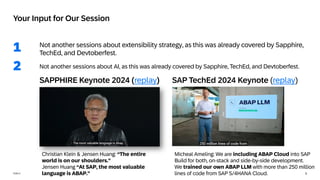
Christian Klein & Jensen Huang: “The entire
world is on our shoulders.”
Jensen Huang “At SAP, the most valuable
language is ABAP.”
SAPPHIRE Keynote 2024 (replay)
Micheal Ameling: We are including ABAP Cloud into SAP
Build for both, on-stack and side-by-side development.
We trained our own ABAP LLM with more than 250 million
lines of code from SAP S/4HANA Cloud.
SAP TechEd 2024 Keynote (replay)
6
PUBLIC
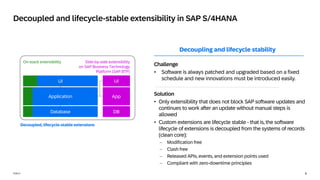
Decoupled and lifecycle-stableextensibility in SAP S/4HANA
UI
Database
UI
Application App
DB
Side-by-side extensibility
on SAP Business Technology
Platform (SAP BTP)
On-stack extensibility
Decoupled, lifecycle-stable extensions
Decoupling and lifecycle stability
Challenge
• Software is always patched and upgraded based on a fixed
schedule and new innovations must be introduced easily.
Solution
• Only extensibility that does not block SAP software updates and
continues to work after an update without manual steps is
allowed
• Custom extensions are lifecycle stable - that is, the software
lifecycle of extensions is decoupled from the systems of records
(clean core):
− Modification free
− Clash free
− Released APIs, events, and extension points used
− Compliant with zero-downtime principles
7.
7
PUBLIC
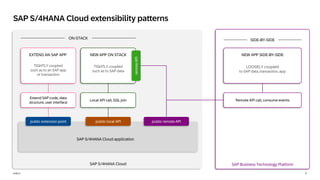
SAP S/4HANA CloudSAP Business Technology Platform
SAP S/4HANA Cloud extensibility patterns
SAP S/4HANA Cloud application
ON-STACK
Local API call, SQL join
NEW APP ON STACK
TIGHTLY coupled
such as to SAP data
public extension point public local API public remote API
EXTEND AN SAP APP
TIGHTLY coupled
such as to an SAP app
or transaction
Extend SAP code, data
structure, user interface
NEW APP SIDE-BY-SIDE
LOOSELY coupled
to SAP data, transaction, app
SIDE-BY-SIDE
Remote API call, consume events
remote
API
8.
8
PUBLIC
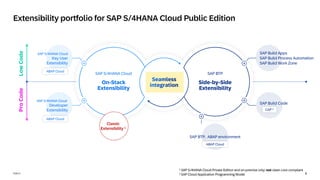
Extensibility portfolio forSAP S/4HANA Cloud Public Edition
Pro
Code
Low
Code
SAP BTP
On-Stack
Extensibility
SAP S/4HANA Cloud
Side-by-Side
Extensibility
SAP Build Apps
SAP Build Process Automation
SAP Build Work Zone
SAP Build Code
SAP BTP, ABAP environment
ABAP Cloud
CAP 2
SAP S/4HANA Cloud
Key User
Extensibility
SAP S/4HANA Cloud
Developer
Extensibility
ABAP Cloud
ABAP Cloud
Seamless
integration
Classic
Extensibility 1
1 SAP S/4HANA Cloud Private Edition and on-premise only; not clean core compliant
2 SAP Cloud Application Programming Model
9.
9
PUBLIC
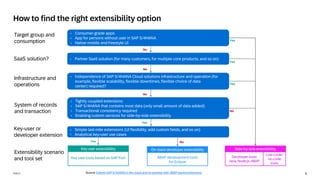
ABAP development tools
forEclipse
Key user tools based on SAP Fiori
Extensibility scenario
and tool set
Key-user or
developer extension
System of records
and transaction
Target group and
consumption
• Consumer-grade apps
• App for persons without user in SAP S/4HANA
• Native mobile and freestyle UI
SaaS solution? • Partner SaaS solution (for many customers, for multiple core products, and so on)
Infrastructure and
operations
• Tightly coupled extensions
• SAP S/4HANA that contains most data (only small amount of data added)
• Transactional consistency required
• Enabling custom services for side-by-side extensibility
• Simple last-mile extensions (UI flexibility, add custom fields, and so on)
• Analytical key-user use cases
Side-by-side extensibility
Developer tools
Java, Node.js, ABAP
Low-code/
no-code
tools
On-stack developer extensibility
Key user extensibility
Yes
Yes
Yes
No
No
• Independence of SAP S/4HANA Cloud solutions infrastructure and operation (for
example, flexible scalability, flexible downtimes, flexible choice of data
center) required?
Yes
Yes
No
No
No
How to find the right extensibility option
Source: Extend SAP S/4HANA in the cloud and on premise with ABAP-based extensions
10.
10
PUBLIC
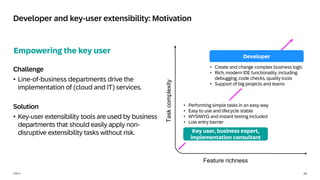
Developer and key-userextensibility: Motivation
Empowering the key user
Challenge
• Line-of-business departments drive the
implementation of (cloud and IT) services.
Solution
• Key-user extensibility tools are used by business
departments that should easily apply non-
disruptive extensibility tasks without risk.
Task
complexity
Feature richness
• Performing simple tasks in an easy way
• Easy to use and lifecycle stable
• WYSIWYG and instant testing included
• Low entry barrier
Developer
• Create and change complex business logic
• Rich, modern IDE functionality, including
debugging, code checks, quality tools
• Support of big projects and teams
Key user, business expert,
implementation consultant
12
PUBLIC
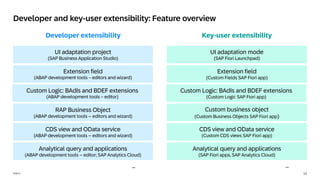
Key-user extensibility
Developer extensibility
Developerand key-user extensibility: Feature overview
UI adaptation project
(SAP Business Application Studio)
UI adaptation mode
(SAP Fiori Launchpad)
Extension field
(ABAP development tools – editors and wizard)
Extension field
(Custom Fields SAP Fiori app)
RAP Business Object
(ABAP development tools – editors and wizard)
Custom business object
(Custom Business Objects SAP Fiori app)
CDS view and OData service
(ABAP development tools – editors and wizard)
CDS view and OData service
(Custom CDS views SAP Fiori app)
Analytical query and applications
(ABAP development tools – editor; SAP Analytics Cloud)
Analytical query and applications
(SAP Fiori apps, SAP Analytics Cloud)
…
…
Custom Logic: BAdIs and BDEF extensions
(ABAP development tools – editor)
Custom Logic: BAdIs and BDEF extensions
(Custom Logic SAP Fiori app)
14
PUBLIC
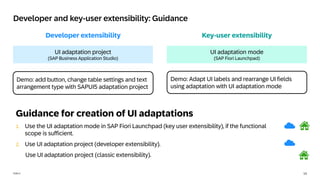
Key-user extensibility
Developer extensibility
Developerand key-user extensibility: Guidance
UI adaptation project
(SAP Business Application Studio)
UI adaptation mode
(SAP Fiori Launchpad)
Guidance for creation of UI adaptations
1. Use the UI adaptation mode in SAP Fiori Launchpad (key user extensibility), if the functional
scope is sufficient.
2. Use UI adaptation project (developer extensibility).
Use UI adaptation project (classic extensibility).
Demo: add button, change table settings and text
arrangement type with SAPUI5 adaptation project
Demo: Adapt UI labels and rearrange UI fields
using adaptation with UI adaptation mode
15.
15
PUBLIC
Key-user extensibility
Developer extensibility
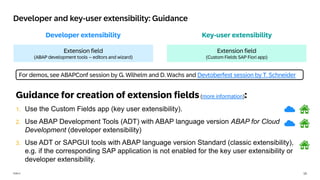
Developerand key-user extensibility: Guidance
Extension field
(ABAP development tools – editors and wizard)
Extension field
(Custom Fields SAP Fiori app)
For demos, see ABAPConf session by G. Wilhelm and D. Wachs and Devtoberfest session by T. Schneider
Guidance for creation of extension fields(more information):
1. Use the Custom Fields app (key user extensibility).
2. Use ABAP Development Tools (ADT) with ABAP language version ABAP for Cloud
Development (developer extensibility)
3. Use ADT or SAPGUI tools with ABAP language version Standard (classic extensibility),
e.g. if the corresponding SAP application is not enabled for the key user extensibility or
developer extensibility.
16.
16
PUBLIC
Key-user extensibility
Developer extensibility
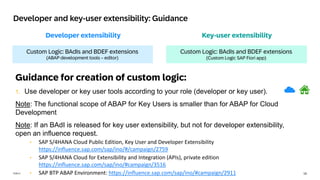
Developerand key-user extensibility: Guidance
UI adaptation project
(SAP Business Application Studio)
UI adaptation mode
(SAP Fiori Launchpad)
Custom Logic: BAdIs and BDEF extensions
(ABAP development tools – editor)
Custom Logic: BAdIs and BDEF extensions
(Custom Logic SAP Fiori app)
Guidance for creation of custom logic:
1. Use developer or key user tools according to your role (developer or key user).
Note: The functional scope of ABAP for Key Users is smaller than for ABAP for Cloud
Development
Note: If an BAdI is released for key user extensibility, but not for developer extensibility,
open an influence request.
• SAP S/4HANA Cloud Public Edition, Key User and Developer Extensibility
https://influence.sap.com/sap/ino/#/campaign/2759
• SAP S/4HANA Cloud for Extensibility and Integration (APIs), private edition
https://influence.sap.com/sap/ino/#campaign/3516
• SAP BTP ABAP Environment: https://influence.sap.com/sap/ino/#campaign/2911
17.
17
PUBLIC
Key-user extensibility
Developer extensibility
Developerand key-user extensibility: Guidance
UI adaptation project
(SAP Business Application Studio)
UI adaptation mode
(SAP Fiori Launchpad)
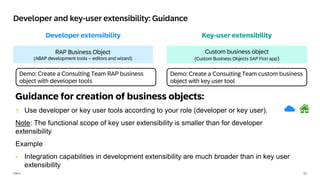
RAP Business Object
(ABAP development tools – editors and wizard)
Custom business object
(Custom Business Objects SAP Fiori app)
Guidance for creation of business objects:
1. Use developer or key user tools according to your role (developer or key user).
Note: The functional scope of key user extensibility is smaller than for developer
extensibility
Example
• Integration capabilities in development extensibility are much broader than in key user
extensibility
Demo: Create a Consulting Team RAP business
object with developer tools
Demo: Create a Consulting Team custom business
object with key user tool
18.
18
PUBLIC
Key-user extensibility
Developer extensibility
Developerand key-user extensibility: Guidance
UI adaptation project
(SAP Business Application Studio)
UI adaptation mode
(SAP Fiori Launchpad)
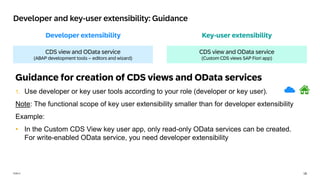
CDS view and OData service
(ABAP development tools – editors and wizard)
CDS view and OData service
(Custom CDS views SAP Fiori app)
Guidance for creation of CDS views and OData services
1. Use developer or key user tools according to your role (developer or key user).
Note: The functional scope of key user extensibility smaller than for developer extensibility
Example:
• In the Custom CDS View key user app, only read-only OData services can be created.
For write-enabled OData service, you need developer extensibility
19.
19
PUBLIC
Key-user extensibility
Developer extensibility
Developerand key-user extensibility: Guidance
UI adaptation project
(SAP Business Application Studio)
UI adaptation mode
(SAP Fiori Launchpad)
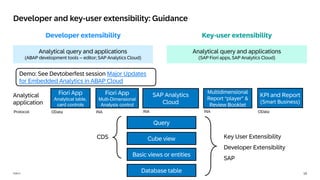
Analytical query and applications
(ABAP development tools – editor; SAP Analytics Cloud)
Analytical query and applications
(SAP Fiori apps, SAP Analytics Cloud)
Demo: See Devtoberfest session Major Updates
for Embedded Analytics in ABAP Cloud
Basic views or entities
Cube view
Query
CDS
Analytical
application
Database table
SAP Analytics
Cloud
KPI and Report
(Smart Business)
Fiori App
Multi-Dimensional
Analysis control
OData
INA
INA
Multidimensional
Report “player” &
Review Booklet
INA
Key User Extensibility
Developer Extensibility
SAP
Fiori App
Analytical table,
card controls
OData
Protocol:
20.
20
PUBLIC
Key-user extensibility
Developer extensibility
Developerand key-user extensibility: Guidance
UI adaptation project
(SAP Business Application Studio)
UI adaptation mode
(SAP Fiori Launchpad)
Analytical query and applications
(ABAP development tools – editor; SAP Analytics Cloud)
Analytical query and applications
(SAP Fiori apps, SAP Analytics Cloud)
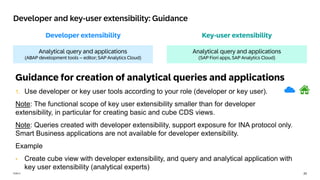
Guidance for creation of analytical queries and applications
1. Use developer or key user tools according to your role (developer or key user).
Note: The functional scope of key user extensibility smaller than for developer
extensibility, in particular for creating basic and cube CDS views.
Note: Queries created with developer extensibility, support exposure for INA protocol only.
Smart Business applications are not available for developer extensibility.
Example
• Create cube view with developer extensibility, and query and analytical application with
key user extensibility (analytical experts)
21.
21
PUBLIC
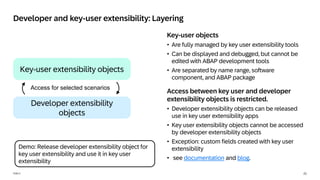
Key-user objects
• Arefully managed by key user extensibility tools
• Can be displayed and debugged, but cannot be
edited with ABAP development tools
• Are separated by name range, software
component, and ABAP package
Access between key user and developer
extensibility objects is restricted.
• Developer extensibility objects can be released
use in key user extensibility apps
• Key user extensibility objects cannot be accessed
by developer extensibility objects
• Exception: custom fields created with key user
extensibility
• see documentation and blog.
Developer and key-user extensibility: Layering
Key-user extensibility objects
Developer extensibility
objects
Access for selected scenarios
Demo: Release developer extensibility object for
key user extensibility and use it in key user
extensibility
22.
22
PUBLIC
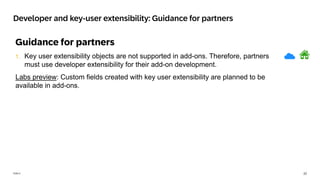
Developer and key-userextensibility: Guidance for partners
Guidance for partners
1. Key user extensibility objects are not supported in add-ons. Therefore, partners
must use developer extensibility for their add-on development.
Labs preview: Custom fields created with key user extensibility are planned to be
available in add-ons.
26
PUBLIC
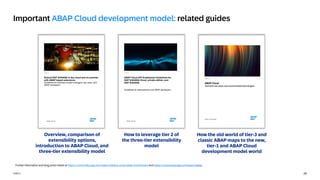
Important ABAP Clouddevelopment model: related guides
Further information and blog posts linked at https://community.sap.com/topics/s4hana-cloud-abap-environment and https://community.sap.com/topics/abap.
Overview, comparison of
extensibility options,
introduction to ABAP Cloud, and
three-tier extensibility model
How to leverage tier 2 of
the three-tier extensibility
model
How the old world of tier-3 and
classic ABAP maps to the new,
tier-1 and ABAP Cloud
development model world
27.
27
PUBLIC
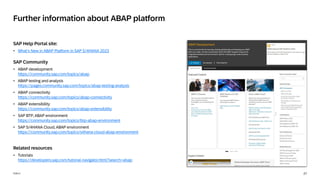
SAP Help Portalsite:
• What‘s New in ABAP Platform in SAP S/4HANA 2023
SAP Community
• ABAP development
https://community.sap.com/topics/abap
• ABAP testing and analysis
https://pages.community.sap.com/topics/abap-testing-analysis
• ABAP connectivity
https://community.sap.com/topics/abap-connectivity
• ABAP extensibility
https://community.sap.com/topics/abap-extensibility
• SAP BTP, ABAP environment
https://community.sap.com/topics/btp-abap-environment
• SAP S/4HANA Cloud, ABAP environment
https://community.sap.com/topics/s4hana-cloud-abap-environment
Related resources
• Tutorials
https://developers.sap.com/tutorial-navigator.html?search=abap
Further information about ABAP platform
28.
28
PUBLIC
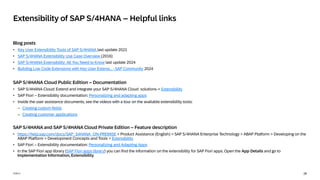
Blog posts
• KeyUser Extensibility Tools of SAP S/4HANA last update 2021
• SAP S/4HANA Extensibility Use Case Overview (2016)
• SAP S/4HANA Extensibility: All You Need to Know last update 2024
• Building Low Code Extensions with Key User Extensi... - SAP Community 2024
SAP S/4HANA Cloud Public Edition – Documentation
• SAP S/4HANA Cloud: Extend and integrate your SAP S/4HANA Cloud solutions-> Extensibility
• SAP Fiori – Extensibility documentation: Personalizing and adapting apps
• Inside the user assistance documents, see the videos with a tour on the available extensibility tools:
– Creating custom fields
– Creating customer applications
SAP S/4HANA and SAP S/4HANA Cloud Private Edition – Feature description
• https://help.sap.com/docs/SAP_S4HANA_ON-PREMISE > Product Assistance (English) > SAP S/4HANA Enterprise Technology > ABAP Platform > Developing on the
ABAP Platform > Development Concepts and Tools > Extensibility
• SAP Fiori – Extensibility documentation: Personalizing and Adapting Apps
• In the SAP Fiori app library (SAP Fiori apps library) you can find the information on the extensibility for SAP Fiori apps. Open the App Details and go to
Implementation Information, Extensibility.
Extensibility of SAP S/4HANA – Helpful links
29.
PUBLIC 29
Week 1- Monday, September 23
9:00 - 10:00
Clean core extensibility with ABAP Cloud in
SAP S/4HANA Cloud Private Edition
11:00 - 12:00
Understand the clean core extensibility options
for SAP S/4HANA Cloud
13:00 - 14:00
Building partner products on SAP BTP ABAP
Environment
15:00 - 16:00
Major updates for embedded analytics in ABAP
Cloud
17:00 - 18:00
Data integration in ABAP Cloud with SQL services
and CDS external entities
Week 2 - Monday, September 30
9:00 - 10:00
Data modelling with the latest features of ABAP
Core Data Services
11:00 - 12:00 Tools for Clean ABAP
13:00 - 14:00 SAP Forms by Adobe
15:00 - 16:00
Test double mechanisms with ABAP Unit - Your
friend in achieving effective test automation
Week 3 - Monday, October 14
8:00 - 9:00
What software developers should know about
key user extensibility
9:00 - 10:00
Boost your coding efficiency: Explore Joule’s
ABAP Developer capabilities
11:00 - 12:00
Developing and transforming your ABAP custom
code for clean core in SAP S/4HANA
14:00 - 15:00
How to extend the different
SAP S/4HANA editions effectively and clean core
compliant
Week 4 - Monday, October 21
9:00 - 10:00 Overview of reuse services in ABAP Cloud
11:00 - 12:00 ABAP Development Tools - News and Roadmap
13:00 - 14:00 DevOps with SAP BTP ABAP Environment
15:00 - 16:00 SAP Business Client & SAP GUI - The Journey
Continues
DEVTOBERFEST 2024
Enjoy and learn more about ABAP
Cloud related topics
30.
PUBLIC 30
KEYNOTES
Tuesday, October8
9:00 - 10:30
AM CEST
&
4:00 - 5:30
PM CEST
[Executive Keynote] SAP TechEd in 2024 Launch
– Where ideas get real
10:30 - 10:55
AM CEST
&
5:30 - 5:55
PM CEST
[Developer Keynote] Keynote recap +
Community welcome
3:30 - 3:55
PM CEST
&
9:00 - 9:25
PM CEST
[Developer Keynote Deconstructed]
Keeping the promise
TRACK OVERVIEWS
Tuesday, October 8
10:30 - 11:15
AM CEST
Unlocking the intelligent enterprise: Cloud ERP
innovations for the future
6:00 - 6:45
PM CEST
Unlock SAP Build and ABAP Cloud
interoperability to elevate your extensions
LECTURES
Tuesday, October 8
6:00 - 6:45
PM CEST
Enhance your fusion team collaboration with
ABAP Cloud and SAP Build
9:00 - 9:30
PM CEST
Boost your coding efficiency: Explore Joule’s
ABAP Developer capabilities
Wednesday, October 9
7:00 - 7:25
PM CEST
Clean core extension of SAP S/4HANA with the
latest ABAP Cloud features
2:30 - 2:55
PM CEST
Extensibility for SAP S/4HANA Cloud
Public Edition
3:00 - 3:25
PM CEST
Clean Core Extensibility for SAP S/4HANA Cloud
Private Edition
3:30 - 3:55
PM CEST
Revolutionize ABAP development with Joule, our
generative AI copilot
JUMP STARTS
Tuesday, October 8
3:30 - 3:55
PM CEST
Build SAP Fiori Apps with ABAP Cloud powered
by Joule's ABAP Developer capabilities
Wednesday, October 9
3:30 - 3:55
PM CEST
Building Clean Core Extensions with ABAP Cloud
for SAP S/4HANA Cloud
TechEd 2024
Join the free, engaging virtual event









![PUBLIC 30
KEYNOTES
Tuesday, October 8
9:00 - 10:30
AM CEST
&
4:00 - 5:30
PM CEST
[Executive Keynote] SAP TechEd in 2024 Launch
– Where ideas get real
10:30 - 10:55
AM CEST
&
5:30 - 5:55
PM CEST
[Developer Keynote] Keynote recap +
Community welcome
3:30 - 3:55
PM CEST
&
9:00 - 9:25
PM CEST
[Developer Keynote Deconstructed]
Keeping the promise
TRACK OVERVIEWS
Tuesday, October 8
10:30 - 11:15
AM CEST
Unlocking the intelligent enterprise: Cloud ERP
innovations for the future
6:00 - 6:45
PM CEST
Unlock SAP Build and ABAP Cloud
interoperability to elevate your extensions
LECTURES
Tuesday, October 8
6:00 - 6:45
PM CEST
Enhance your fusion team collaboration with
ABAP Cloud and SAP Build
9:00 - 9:30
PM CEST
Boost your coding efficiency: Explore Joule’s
ABAP Developer capabilities
Wednesday, October 9
7:00 - 7:25
PM CEST
Clean core extension of SAP S/4HANA with the
latest ABAP Cloud features
2:30 - 2:55
PM CEST
Extensibility for SAP S/4HANA Cloud
Public Edition
3:00 - 3:25
PM CEST
Clean Core Extensibility for SAP S/4HANA Cloud
Private Edition
3:30 - 3:55
PM CEST
Revolutionize ABAP development with Joule, our
generative AI copilot
JUMP STARTS
Tuesday, October 8
3:30 - 3:55
PM CEST
Build SAP Fiori Apps with ABAP Cloud powered
by Joule's ABAP Developer capabilities
Wednesday, October 9
3:30 - 3:55
PM CEST
Building Clean Core Extensions with ABAP Cloud
for SAP S/4HANA Cloud
TechEd 2024
Join the free, engaging virtual event](https://image.slidesharecdn.com/abapconf2024-keyuseranddeveloperextensibilityoptions-bestpractices-260207041144-eebb2947/85/ABAPConf-2024-Key-User-and-Developer-Extensibility-Options-Best-Practices-pdf-30-320.jpg)