1
PUBLIC
PUBLIC
TABLE OF CONTENTS
EFFECTIVEDATE.....................................................................................................................3
1.0 SUPERVISORY GUIDANCE NOTE ON THE USE OF THE GHANA CARD FOR
FINANCIAL TRANSACTIONS.......................................................................................4
2.0 VERIFICATION PROCEDURES FOR ON-BOARDING CUSTOMERS..........................4
3.0 VERIFICATION PROCEDURES FOR ON-BOARDING CUSTOMERS ON MOBILE
APPLICATIONS AND INTERNET BANKING PLATFORMS.........................................5
4.0 VERIFICATION PROCEDURES FOR EXISTING CUSTOMERS UNDERTAKING
TRANSACTIONS............................................................................................................5
5.0 VERIFICATION PROCEDURES FOR FOREIGN NON-RESIDENTS WHO ARE IN
THE COUNTRY FOR LESS THAN 90 DAYS AND UNDERTAKING ONE-OFF
TRANSACTIONS............................................................................................................6
6.0 VERIFICATION PROCEDURES FOR FOREIGN DIPLOMATS AND THEIR
DEPENDENTS ................................................................................................................6
7.0 VERIFICATION PROCEDURES FOR THIRD PARTIES AND NON-FACE-TO-FACE
TRANSACTIONS............................................................................................................7
8.0 NO MATCH OR FAILED VERIFICATION PROCEDURES ...........................................7
9.0 PROCEDURES FOR NO MATCH OR FAILED VERIFICATION OF EXISTING
CUSTOMERS..................................................................................................................8
10.0 PROCEDURES FOR FAILED AND NO MATCH VERIFICATION FOR ON-BOARDING
........................................................................................................................................8
11.0 PROCEDURES FOR “FAILED AND NO MATCH” VERIFICATION FOR THIRD
PARTY TRANSACTIONS...............................................................................................9
12.0 ESCALATION MATRIX FOR THE NIA VERIFICATION SYSTEM ..............................9
13.0 PERFORMING ONLINE VERIFICATIONS ...................................................................9
14.0 CAUSES AND SOLUTIONS TO FAILED FACE VERIFICATION RESULTS ...............10
15.0 CAUSES AND SOLUTIONS TO FAILED SINGLE FINGER VERIFICATION RESULT
......................................................................................................................................11
16.0 CAUSES AND SOLUTIONS TO FAILED NO CARD PRESENT VERIFICATION
RESULT........................................................................................................................12
17.0 CAUSES AND SOLUTIONS TO FAILED VERIFICATION RESULTS..........................13
18.0 STEPS FOR NOTIFICATION AND RECTIFICATION OF A “NO MATCH” OR
“FAILED” VERIFICATION..........................................................................................14
19.0 BUSINESS CONTINUITY PROCEDURES FOR THE USE OF THE GHANA CARD ....14
20.0 PROCESS FLOW ON HOW TO ACCESS VERIFICATION DATA ON THE MECO
DEVICE ........................................................................................................................15
21.0 OTHER BCP STEPS/ PROCEDURES FOR INSTITUTIONS TO FOLLOW..................15
3.
2
PUBLIC
PUBLIC
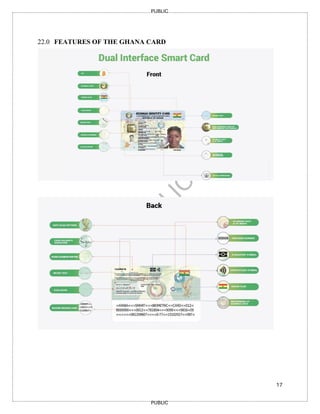
22.0 FEATURES OFTHE GHANA CARD............................................................................17
23.0 TRANSITIONAL PROVISIONS....................................................................................18
4.
3
PUBLIC
PUBLIC
EFFECTIVE DATE
This revisedSupervisory Guidance Note on the use of Ghana Card for Accountable Institutions,
October 2025 comes into effect from the date of issue and replaces the Supervisory Guidance Note
on the use of Ghana Card for Accountable Institutions, June 2022.
5.
4
PUBLIC
PUBLIC
1.0 SUPERVISORY GUIDANCENOTE ON THE USE OF THE GHANA CARD FOR
FINANCIAL TRANSACTIONS
The National Identity Register Regulations, 2012 (L.I. 2111) mandate the use of the
National Identity Card, commonly known as the “Ghana Card”, for transactions where
identification is required.
In furtherance of the above, the Bank of Ghana issued the Notice Number
BOG/GOV/SEC/01 mandating all Bank of Ghana licensed and regulated financial
institutions to accept the Ghana Card as the sole identity document for transactions.
This Guidance Note is to provide clarity to the Bank of Ghana Notice Number
BG/GOV/SEC/2025/36 issued 13th
November, 2025 and aims to ensure compliance with
Know Your Customer (KYC) and Customer Due Diligence (CDD) requirements.
2.0 VERIFICATION PROCEDURES FOR ON-BOARDING CUSTOMERS
1. Accountable Institutions (AIs) shall use only the Ghana Card to identify and verify all
customers, including Ghanaian Citizens living in Ghana and Abroad, Permanent
Residents and Economic Community of West African States (ECOWAS) Nationals who
are residents during onboarding (Account Opening)
2. AIs shall use only the Ghana Card to identify and verify Foreign Directors/Shareholders
and Non-Residents who are signatories to accounts during onboarding (Account
Opening).
3. AIs during the onboarding of new customers shall, in addition to KYC/CDD/EDD
requirements, apply the following:
a. Verify the identity of the customer using any of the biometric features the Ghana
Card, Non-Citizen Identity Card or Refugee Identity Card in the case of non-
Ghanaians.
b. Update customer KYC data set using information from the National Identity
Authority (NIA)
c. In cases where the following data sets acquired from NIA differ:
i. Secondary (Dynamic) data - The AIs shall verify and update using procedures
prescribed by the NIA in this Guideline. Such data set includes local phone
number, foreign phone number, residential address, postal address, digital-GPS
address, name of next of kin, address of next of kin, occupation and email
address.
ii. Primary data – The AIs shall refer the customer to NIA for updates regarding
their personal information. Such data set includes surname, first name, previous
names, date of birth, sex, height, picture and nationality.
6.
5
PUBLIC
PUBLIC
3.0 VERIFICATION PROCEDURESFOR ON-BOARDING CUSTOMERS ON
MOBILE APPLICATIONS AND INTERNET BANKING PLATFORMS
1. Given the inherent Money Laundering, Terrorist Financing and Proliferation Financing
(ML/TF/PF) risks associated with non-face-to-face technologies, identification and
verification shall not be risk-based.
2. AIs during the onboarding of new customers on mobile banking applications and
internet banking platforms shall conduct the following:
a. Verify the identity of the customer using the Ghana Card, Non-Citizen Identity
Card or Refugee Identity Card in the case of non-Ghanaians.
b. Utilise a liveness check to biometrically verify the customer.
c. Collect all KYC/CDD/EDD requirements as applicable in anti-money laundering,
combating the financing of terrorism and combating the financing of proliferation
of weapons of mass destruction (AML/CFT/CPF) laws, regulations and guidelines.
d. Update customer KYC data set using information from the National Identity
Authority (NIA).
e. In cases where the following data sets acquired from the NIA differ:
i. Secondary (Dynamic) data - The AIs shall verify and update using procedures
prescribed by the NIA in this Guideline. Such data set includes local phone
number, foreign phone number, residential address, postal address, digital-
GPS address, name of next of kin, address of next of kin, occupation and
email address.
ii. Primary data – The AIs shall refer the customer to NIA for updates regarding
their personal information. Such data set includes surname, first name,
previous names, date of birth, sex, height, picture and nationality.
4.0 VERIFICATION PROCEDURES FOR EXISTING CUSTOMERS UNDERTAKING
TRANSACTIONS
1. For existing customers in the following categories:
a) Ghanaian Citizens
b) Foreign National Permanently Resident in Ghana (e.g. ECOWAS Nationals)
c) Foreign National cumulatively resident in Ghana for at least 90 days
d) Dual Citizen
e) Foreign Directors/ Shareholders who are signatories to the account and operate the
account.
f) Refugees
2. AIs shall, on a risk-based approach, verify the identity of the customer
3. AIs as part of ongoing due diligence shall update existing customers' data.
4. In cases where the new data sets acquired from the NIA differ:
i. Secondary (Dynamic) data - The AIs shall verify and update using procedures
prescribed by the NIA in this Guideline. Such data set includes local phone
number, foreign phone number, residential address, postal address, digital-GPS
7.
6
PUBLIC
PUBLIC
address, name ofnext of kin, address of next of kin, occupation and email
address.
ii. Primary data – The AIs shall refer the customer to NIA for updates regarding
their personal information. Such data set includes surname, first name, previous
names, date of birth, sex, height, picture and nationality.
5. In the case where the customer does not physically possess the Ghana Card/ Non-Citizen
Identity Card/Refugee Identity Card, the AI shall use the biometric information to verify
and update appropriate customer records.
6. Where a customer has not registered for the Ghana Card, Non-Citizen Identity Card or
Refugee Identity Card, the AI shall not undertake any financial transaction for or on
behalf of the customer.
5.0 VERIFICATION PROCEDURES FOR FOREIGN NON-RESIDENTS WHO ARE
IN THE COUNTRY FOR LESS THAN 90 DAYS AND UNDERTAKING ONE-OFF
TRANSACTIONS
1. AIs shall only undertake the following one-off transactions for or on behalf of foreign
customers who are non-resident in the country:
a. Remittance;
b. Third-party deposit or withdrawal; and
c. ATM/POS (e.g. VISA/MasterCard) transactions.
2. AIs shall obtain and verify the identity of the customer using a valid international
passport.
3. AIs shall apply a risk-based approach in undertaking additional KYC/CDD/EDD
procedures at a minimum in obtaining the following:
a. visa information;
b. date of entry into the country;
c. foreign residential address; and
d. residential address in Ghana.
4. AIs shall keep records of the verification and transaction
6.0 VERIFICATION PROCEDURES FOR FOREIGN DIPLOMATS AND THEIR
DEPENDENTS
1. For all Foreign Diplomats and their Dependents undertaking the following transactions;
a. onboarding
b. one-off
c. on-going transactions.
2. AIs shall;
8.
7
PUBLIC
PUBLIC
a. obtain andverify the identity of the customer using an identity document such as
diplomatic passport/card issued by a competent authority
b. keep records of the verification and transaction.
c. in addition, apply a risk-based KYC/CDD/EDD procedure.
7.0 VERIFICATION PROCEDURES FOR THIRD PARTIES AND NON-FACE-TO-
FACE TRANSACTIONS
1. Given the inherent ML/TF/PF risks associated with third-party and non-face-to-face
transactions, identification and verification shall not be risk-based.
2. AIs in performing third-party transactions and in addition to KYC/CDD/EDD
requirements, shall conduct the following:
a. Verify the identity of the third-party using the Ghana Card, Non-Citizen Identity
Card or Refugee Identity Card in the case of non-Ghanaians.
b. Verify the biometrics of the third-party using finger (s) and/or face
3. In the case where a third party has been formally introduced by an introductory letter
from the account holder or a Board Resolution, the AI shall conduct the following:
a. Validate the introductory letter/board resolution
b. Verify the identity of the third-party using the Ghana Card, Non-Citizen Identity
Card or Refugee Identity Card in the case of non-Ghanaians,
c. Verify the biometrics of the third-party using finger(s) and/or face
d. Attach the third-party information to the account
4. AIs in performing multiple and/or linked transactions for third parties shall undertake
the following:
a. In the case where the third party is performing the transactions with the same
officers, the third party shall be verified once.
b. In the case where the third party is performing the transaction with multiple
officers, the third party shall be verified multiple times.
5. AIs in performing transactions of existing customers on mobile banking platforms shall
biometrically verify the identity using the finger (s) and/or face.
6. AIs shall keep records of the verification and transaction of both the third-party and non-
face-to-face transactions.
8.0 NO MATCH OR FAILED VERIFICATION PROCEDURES
8.1 NO MATCH
A “NO MATCH” verification is a case where:
1. The data (Card/Biometric) presented to the verification system does not match with
anyone in the system.
2. Only the biometric data presented for verification is successfully captured, but it does
not match the identity of a registered person.
9.
8
PUBLIC
PUBLIC
3. The GhanaCard PIN being used with the biometrics of the customer was mistyped.
4. The customer presenting the Ghana Card as identification and verification for
transaction(s) is not the lawful owner of the Ghana Card.
8.2 FAILED
A “FAILED” verification is a situation where;
1. the biometric data sent to the verification system is not of sufficient quality to be
processed.
2. there is poor network quality
9.0 PROCEDURES FOR NO MATCH OR FAILED VERIFICATION OF EXISTING
CUSTOMERS
1. Where there is “No Match” or “Failed” verification of identity for an existing
customer, the AI shall:
a. follow the escalation matrix for correction of the “No Match or “Failed” verification
as prescribed in the Identity Verification System Platform (IVSP) Support
Document, as indicated below.
b. contact the IVSP Customer Support Center for notification and rectification if the
escalation matrix procedure was unsuccessful.
c. apply a risk-based approach and use the unique verification code generated by the
National Identification Authority (NIA) for the identification of the customer.
d. advise the customer to contact NIA for an update of records.
10.0 PROCEDURES FOR FAILED AND NO MATCH VERIFICATION FOR ON-
BOARDING
1. Where this is a “No Match or Failed” verification of identity for a new customer, the
AI shall:
a. follow the escalation matrix for correction of the “No Match or “Failed” verification
as prescribed in the IVSP Support Document indicated below.
b. contact the IVSP Customer Support Center for notification and rectification if the
escalation matrix procedure was unsuccessful.
c. flag the account as post no debit
d. provide customer a ninety (90) days deferral period to update records before
completing the account opening process and making the account operational.
10.
9
PUBLIC
PUBLIC
11.0 PROCEDURES FOR“FAILED AND NO MATCH” VERIFICATION FOR THIRD
PARTY TRANSACTIONS
1. Where there is a “No match or failed” verification of identity for a third party, the AI
shall:
a. follow the escalation matrix for correction of the “No Match or “Failed” verification
as prescribed in the IVSP Support Document, as indicated below.
b. contact the IVSP Support Center for rectification and generation of a unique
verification code if the escalation matrix procedure was unsuccessful.
c. use the unique verification code generated by NIA for unsuccessful escalation
procedure for the identification of the customer in addition to KYC/CDD/EDD
procedures conducted.
12.0 ESCALATION MATRIX FOR THE NIA VERIFICATION SYSTEM
12.1 INTRODUCTION
This document highlights the techniques that can be used in cases of no match verifications.
The verification platform provides several methods to be used to verify Ghana cardholders.
In peculiar cases, the cardholder gets a “no match” result. If there is no doubt that the Ghana
cardholder is who they claim to be, AIs shall implement the following steps to resolve the
verification issues.
12.2 VERIFICATION METHODS
1. No Card Present or No Card PIN Verification: is used to verify a person who is
without the Ghana Card ID or does not know his / her Personal ID Number
(PIN). The verification is done using KYC or Yes/ No 4-4-2 device.
2. Single finger verification can be used to perform verifications. The preferred digits
are the thumbs or index fingers. If there is a “no match” result, the officer must
perform another verification with a different finger.
3. Face verifications can be performed. If this leads to a “no match” result, the teller
can verify using a single-finger verification.
4. Offline verification is also a method where the card is required
13.0 PERFORMING ONLINE VERIFICATIONS
13.1 HOW TO PERFORM YES/NO OR KYC FACE VERIFICATIONS CORRECTLY
1. To perform a Yes/No or KYC face verification, the end users' Ghana Card PIN and
biometrics are required.
11.
10
PUBLIC
PUBLIC
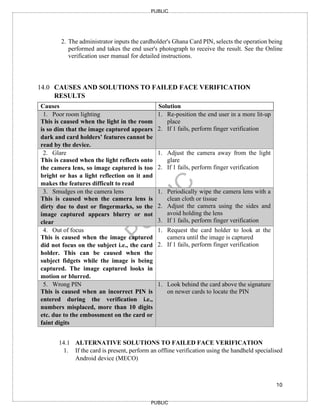
2. The administratorinputs the cardholder's Ghana Card PIN, selects the operation being
performed and takes the end user's photograph to receive the result. See the Online
verification user manual for detailed instructions.
14.0 CAUSES AND SOLUTIONS TO FAILED FACE VERIFICATION
RESULTS
Causes Solution
1. Poor room lighting
This is caused when the light in the room
is so dim that the image captured appears
dark and card holders’ features cannot be
read by the device.
1. Re-position the end user in a more lit-up
place
2. If 1 fails, perform finger verification
2. Glare
This is caused when the light reflects onto
the camera lens, so image captured is too
bright or has a light reflection on it and
makes the features difficult to read
1. Adjust the camera away from the light
glare
2. If 1 fails, perform finger verification
3. Smudges on the camera lens
This is caused when the camera lens is
dirty due to dust or fingermarks, so the
image captured appears blurry or not
clear
1. Periodically wipe the camera lens with a
clean cloth or tissue
2. Adjust the camera using the sides and
avoid holding the lens
3. If 1 fails, perform finger verification
4. Out of focus
This is caused when the image captured
did not focus on the subject i.e., the card
holder. This can be caused when the
subject fidgets while the image is being
captured. The image captured looks in
motion or blurred.
1. Request the card holder to look at the
camera until the image is captured
2. If 1 fails, perform finger verification
5. Wrong PIN
This is caused when an incorrect PIN is
entered during the verification i.e.,
numbers misplaced, more than 10 digits
etc. due to the embossment on the card or
faint digits
1. Look behind the card above the signature
on newer cards to locate the PIN
14.1 ALTERNATIVE SOLUTIONS TO FAILED FACE VERIFICATION
1. If the card is present, perform an offline verification using the handheld specialised
Android device (MECO)
12.
11
PUBLIC
PUBLIC
14.2 HOW TOPERFORM SINGLE FINGER YES/NO OR KYC
VERIFICATIONS CORRECTLY
1. To perform a Yes/No or KYC finger verification, the end user's Ghana card PIN and
biometrics are required.
The administrator inputs the Ghana Card PIN, from the dropdown lists selects the finger, selects
the mode of operation, and captures the finger initially selected from the dropdown list to complete
the verification process and receive a result. Refer to the Online verification user manual for
detailed instructions.
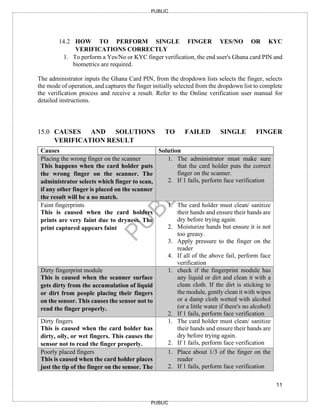
15.0 CAUSES AND SOLUTIONS TO FAILED SINGLE FINGER
VERIFICATION RESULT
Causes Solution
1. Placing the wrong finger on the scanner
This happens when the card holder puts
the wrong finger on the scanner. The
administrator selects which finger to scan,
if any other finger is placed on the scanner
the result will be a no match.
1. The administrator must make sure
that the card holder puts the correct
finger on the scanner.
2. If 1 fails, perform face verification
2. Faint fingerprints
This is caused when the card holders
prints are very faint due to dryness. The
print captured appears faint
1. The card holder must clean/ sanitize
their hands and ensure their hands are
dry before trying again.
2. Moisturize hands but ensure it is not
too greasy.
3. Apply pressure to the finger on the
reader
4. If all of the above fail, perform face
verification
3. Dirty fingerprint module
This is caused when the scanner surface
gets dirty from the accumulation of liquid
or dirt from people placing their fingers
on the sensor. This causes the sensor not to
read the finger properly.
1. check if the fingerprint module has
any liquid or dirt and clean it with a
clean cloth. If the dirt is sticking to
the module, gently clean it with wipes
or a damp cloth wetted with alcohol
(or a little water if there's no alcohol)
2. If 1 fails, perform face verification
4. Dirty fingers
This is caused when the card holder has
dirty, oily, or wet fingers. This causes the
sensor not to read the finger properly.
1. The card holder must clean/ sanitize
their hands and ensure their hands are
dry before trying again.
2. If 1 fails, perform face verification
5. Poorly placed fingers
This is caused when the card holder places
just the tip of the finger on the sensor. The
1. Place about 1/3 of the finger on the
reader
2. If 1 fails, perform face verification
13.
12
PUBLIC
PUBLIC
sensor is unableto capture the print
properly
6. Wrong PIN
This is caused when an incorrect PIN is
used during the verification i.e., numbers
misplaced, more than 10 digits etc. due to
the embossment on the card or faintly
printed digits
1. Look behind the card above signature
on the newer card to locate the PIN
15.1.1 ALTERNATIVE SOLUTIONS TO FAILED FINGER VERIFICATION
1. If the card is present, perform an offline verification using the MECO device.
15.2 HOW TO PERFORM NO CARD PRESENT (4-4-2) YES/NO OR KYC
FINGER VERIFICATIONS CORRECTLY
1. To perform a no-card Yes/No or KYC finger verification, the end users' 10
fingerprints shall be captured
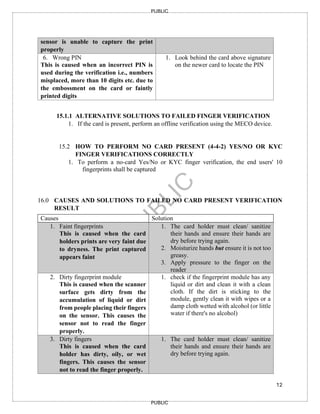
16.0 CAUSES AND SOLUTIONS TO FAILED NO CARD PRESENT VERIFICATION
RESULT
Causes Solution
1. Faint fingerprints
This is caused when the card
holders prints are very faint due
to dryness. The print captured
appears faint
1. The card holder must clean/ sanitize
their hands and ensure their hands are
dry before trying again.
2. Moisturize hands but ensure it is not too
greasy.
3. Apply pressure to the finger on the
reader
2. Dirty fingerprint module
This is caused when the scanner
surface gets dirty from the
accumulation of liquid or dirt
from people placing their fingers
on the sensor. This causes the
sensor not to read the finger
properly.
1. check if the fingerprint module has any
liquid or dirt and clean it with a clean
cloth. If the dirt is sticking to the
module, gently clean it with wipes or a
damp cloth wetted with alcohol (or little
water if there's no alcohol)
3. Dirty fingers
This is caused when the card
holder has dirty, oily, or wet
fingers. This causes the sensor
not to read the finger properly.
1. The card holder must clean/ sanitize
their hands and ensure their hands are
dry before trying again.
14.
13
PUBLIC
PUBLIC
4. Poorly placedfingers
This is caused when the card
holder places just the tip of the
finger on the sensor. The sensor
is unable to capture the print
properly
1. Rest fingers on the reader so the base of
the fingers are not raised off it
2. Pay attention to the prompts given on
the screen and device so fingers are not
lifted before proper prints are captured
16.1 ALTERNATIVE SOLUTIONS TO FAILED NO CARD PRESENT
VERIFICATION
1. If the cardholder continues to receive a false verification and his/her card is present,
perform a KYC finger/face verification.
2. Should the above fail, perform an offline verification using the MECO device.
16.2 HOW TO PERFORM FACE VERIFICATIONS CORRECTLY
1. To perform a Yes/No or KYC face verification, the end users' Ghana card CAN
(Card Access Number) and biometrics are required.
2. The administrator shall input the cardholder's Card Access Number, which is the 6-
digit number beneath the picture on the Ghana Card and captures the end user's
image to complete the verification process and receive a result. Refer to the MECO
verification user manual for detailed instructions.
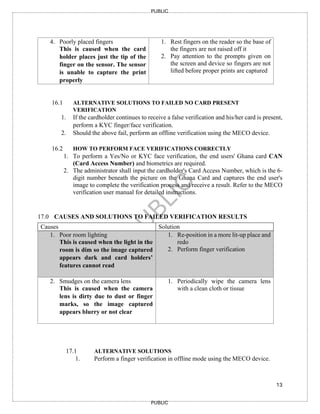
17.0 CAUSES AND SOLUTIONS TO FAILED VERIFICATION RESULTS
Causes Solution
1. Poor room lighting
This is caused when the light in the
room is dim so the image captured
appears dark and card holders’
features cannot read
1. Re-position in a more lit-up place and
redo
2. Perform finger verification
2. Smudges on the camera lens
This is caused when the camera
lens is dirty due to dust or finger
marks, so the image captured
appears blurry or not clear
1. Periodically wipe the camera lens
with a clean cloth or tissue
17.1 ALTERNATIVE SOLUTIONS
1. Perform a finger verification in offline mode using the MECO device.
15.
14
PUBLIC
PUBLIC
17.2 HOW TOPERFORM FINGER VERIFICATION IN OFFLINE MODE
USING THE MECO DEVICE
1. To perform a finger verification, the end user's Ghana card PIN and
biometric are required.
2. The administrator shall input the Cardholder's Card Access Number (CAN),
which is the 6-digit number beneath the picture on the Ghana Card, select
the finger and capture a fingerprint to complete the verification process and
receive a result. Refer to the Offline verification user manual for detailed
instructions
18.0 STEPS FOR NOTIFICATION AND RECTIFICATION OF A “NO MATCH” OR
“FAILED” VERIFICATION
1. The designated Officer shall follow the steps below if a “No Match” or “Failed”
Verification persists after adhering to the escalation matrix above:
a. Obtain the error code generated by the system
b. Send an email with the error code to the IVSP Support Channel at
https://verificationsupport.ims.gh.org/
19.0 BUSINESS CONTINUITY PROCEDURES FOR THE USE OF THE GHANA
CARD
1. AIs, in using the National Identification Authority’s Identity Verification System
Platform (IVSP) to perform verifications during system downtimes and updates shall;
a. Contact the IVSP Support Channel to ascertain that the system is down or
undergoing updates, if applicable.
b. Log the incident, indicating the time and date
c. Use the MECO device to conduct verification in offline mode by undertaking the
following:
Facial Verification
a) The physical Ghana Card of the customer shall be placed at the contact or
contactless reader points on the MECO device.
b) The administrator shall input the cardholder's Card Access Number (CAN), which
is the 6-digit number beneath the picture section of the Ghana Card and capture
the end user's live facial image to complete the verification process and receive a
result. Refer to the MECO verification user manual for detailed instructions.
Fingerprint Verification
16.
15
PUBLIC
PUBLIC
a) The physicalGhana Card of the customer shall be placed at the contact or contactless
reader points of the MECO device.
b) The administrator shall input the cardholder's Card Access Number (CAN), which is
the 6-digit number beneath the picture section on the Ghana Card and capture the end
users’ fingerprint to complete the verification process and receive a result. Refer to
the MECO verification user manual for detailed instructions.
3. In the case of no physical card present for third parties, only deposits shall be performed
and obtain details (Name, ID number, phone number, and signature at a minimum).
4. In the case of no physical card present for existing customers, only deposits shall be
performed and details obtained (name, ID number, phone number, and signature at a
minimum).
5. AIs shall keep records of the processes above.
20.0 PROCESS FLOW ON HOW TO ACCESS VERIFICATION DATA ON THE MECO
DEVICE
Institutions are required to configure a callback URL, which serves as the destination for receiving
verification result data. To access this data, users should consult their in-house technical team
responsible for the callback URL set up for assistance.
When the device operates in online mode (connected to a network), verification results are
automatically transmitted to the institution’s callback URL.
For offline mode (not connected to a network), the following steps must be followed to retrieve
the data:
▪ Open the control center on the MECO device and tap the Data/WIFI icon to connect the
device to a network. This action will send the data to the institution’s callback URL.
▪ Once connected, access the callback URL to view the verification data or response.
21.0 OTHER BCP STEPS/ PROCEDURES FOR INSTITUTIONS TO FOLLOW
Adoption of a multi-modal approach to verification is advised. This is to ensure alternative
verification solutions are readily available if challenges with a particular interface are being
faced.
a) In the event there is a challenge with capturing the fingerprint of a customer, the
institution shall proceed to conduct a facial verification on any of the verification
solutions that support facial verification.
17.
16
PUBLIC
PUBLIC
b) In theevent there is a challenge in capturing the facial biometrics of a customer, the
institution shall proceed to conduct fingerprint verification on any of the verification
solutions that support fingerprint verification.
To ensure better documentation and efficient tracking, institutions are now required to raise tickets
directly on the upgraded verification support portal at https://verificationsupport.imsgh.org/ This
portal enables seamless account creation, allowing the support team to quickly identify the
institution submitting the ticket.
▪ To sign in, navigate to the URL https://verificationsupport.imsgh.org/ and provide your full
name along with your corporate email address.
▪ You will receive an email from Verification Support - click the link within it to activate
your account.
▪ Next, create a secure password that adheres to the specified requirements. Your name will
be automatically pre-filled in the respective field.
▪ Once you have entered the required details, click the "Activate and Login" tab to complete
the process.
▪ Upon successful login, the user will be redirected to a dashboard where all features and
functionalities of the support platform are readily available.
18
PUBLIC
PUBLIC
23.0 TRANSITIONAL PROVISIONS
1.AIs shall note that linking one's Ghana Card to the bank account does not have an expiry
date and shall be part of ongoing KYC/CDD/EDD procedures.
2. Ghanaians abroad who do not have access to attain/acquire Ghana Card in their country of
residence should be allowed to use their passports to access banking transactions until such
time that the Ghana Card will be made available for them to attain/acquire.
3. Deposits (cash, cheque, transfers) by third parties into accounts of customers (account
holders) who have not updated their records with the Ghana Card should be allowed by
financial institutions. However, no debit withdrawal should be placed on such customer
accounts.
4. In line with the National Identity Registration Regulation L.I. 2111(2), which exempts
Diplomatic Corps from usage of the Ghana Card, members of the Diplomatic Corps should
be allowed to use the foreign passport as a means of identification for banking transactions.